Six months later
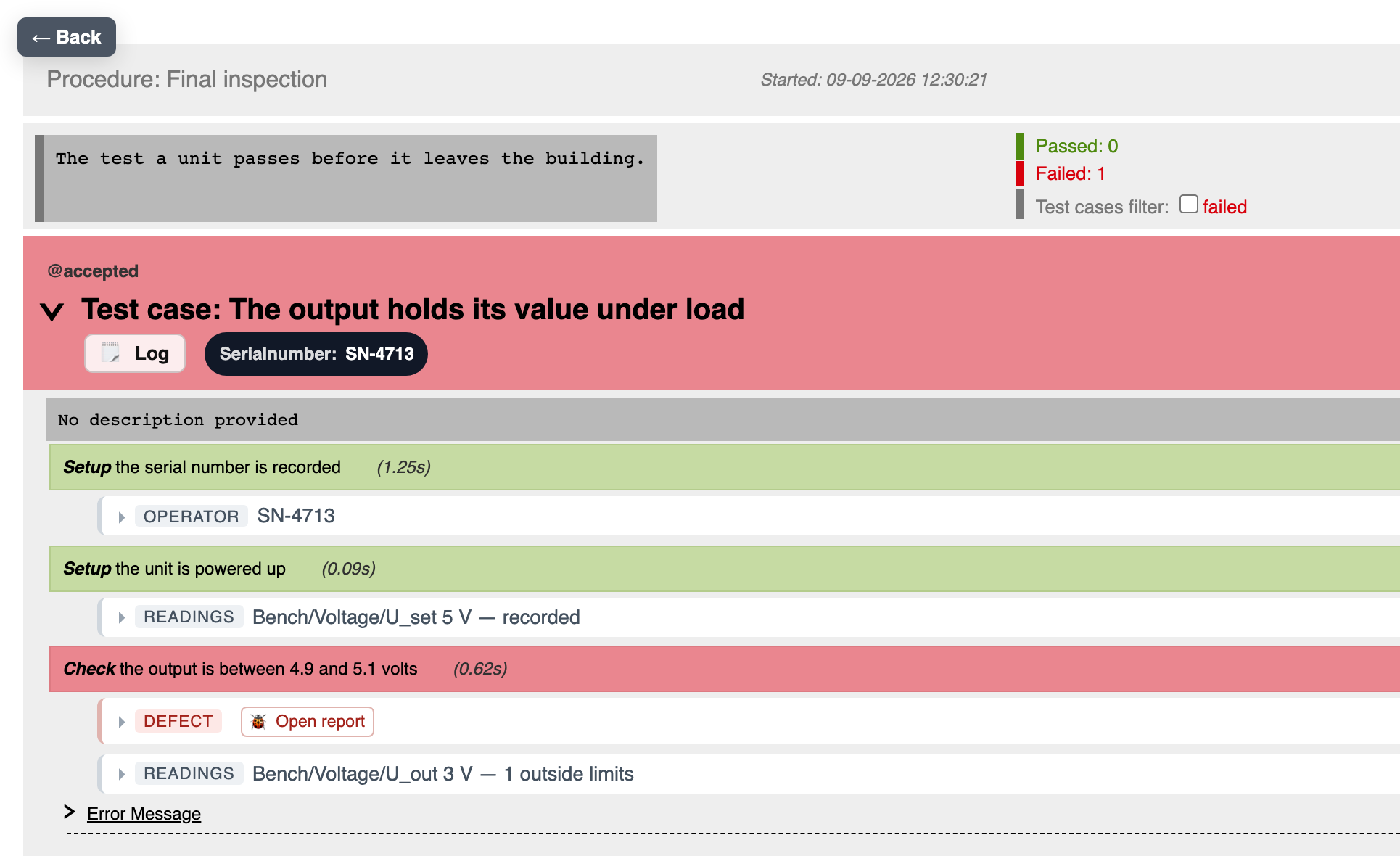
Your customer asks about serial number 0042
The unit left your plant long ago, and now the question is on the table: what exactly was tested on this one? A record kept by hand reaches its limits here, the answers sit scattered across spreadsheets, emails and people’s heads:
- Was the measured value, 4.7 V against a limit of 4.5 to 5.0, really within the window?
- Which firmware version was on serial number 0042 when it was tested?
- Who tested it, and at which station?
- Was every step actually completed?
With a handful of units you can reconstruct this. With 5,000 you can’t.
Companies that trust RX-Systems
RX-Systems customers from our testing projects.














Where it comes from
The test case exists. The execution is missing.
Most embedded teams have good requirements, experienced systems engineers and often a list of manual test cases too. What’s missing is the bridge in between.
Because a test case as text is not yet a test. It has to drive devices, measure signals, monitor interfaces, bring in operator actions, assess limits and document results under version control.
Either a lot of manual work goes into that – or someone builds bespoke Python, LabVIEW or bench software. Both cost: expert time, development budget and release lead time.
The release then hangs on individual people. When something changes, nobody is sure which tests have to run again. So too much gets tested, too late – or both.
The solution
System test on the real device: test, don't administer
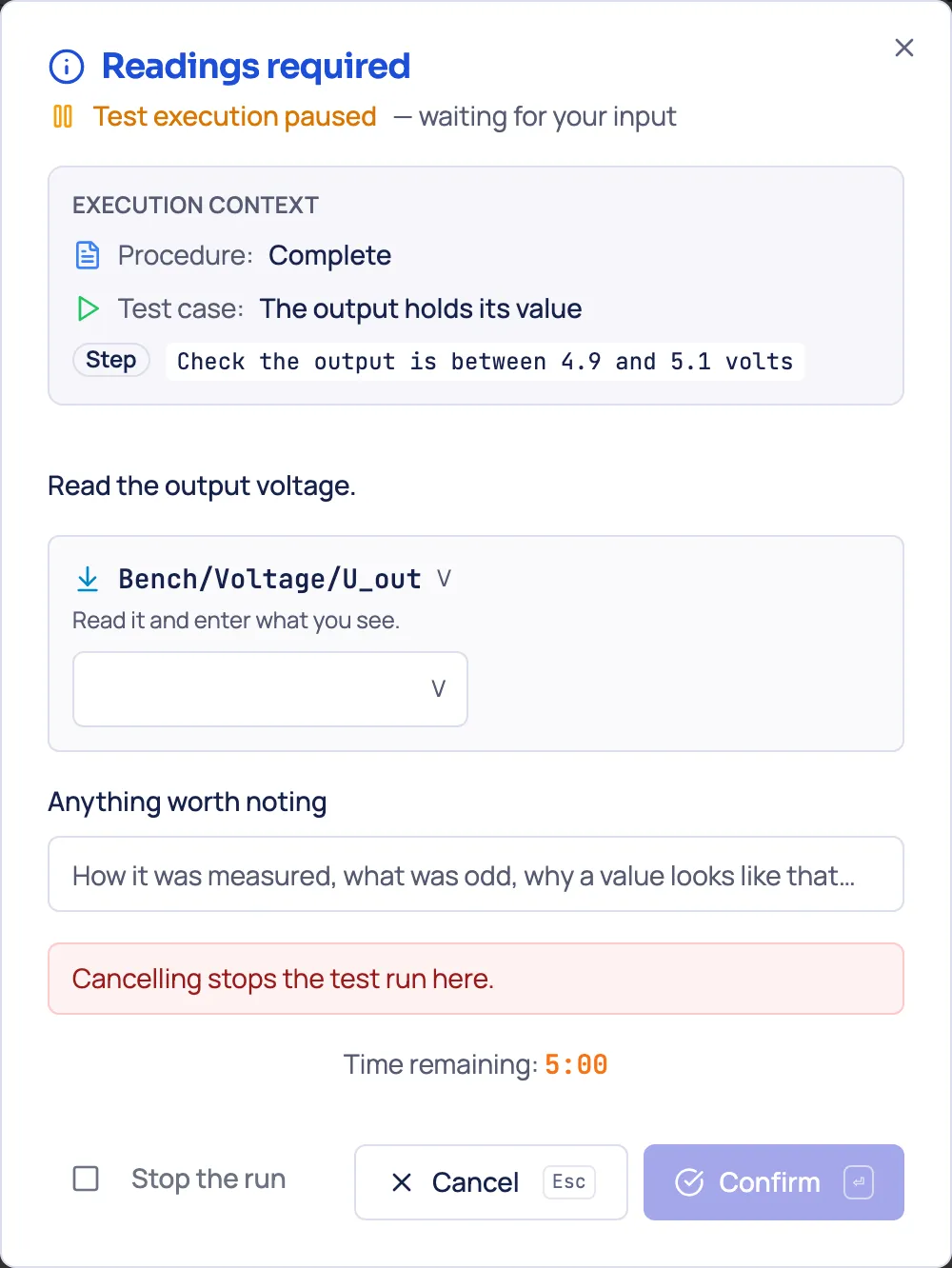
A test step tells the operator what to do, takes in the reading and compares it against its limit – or it reads the value itself when a device is connected. The same step, the same assessment.
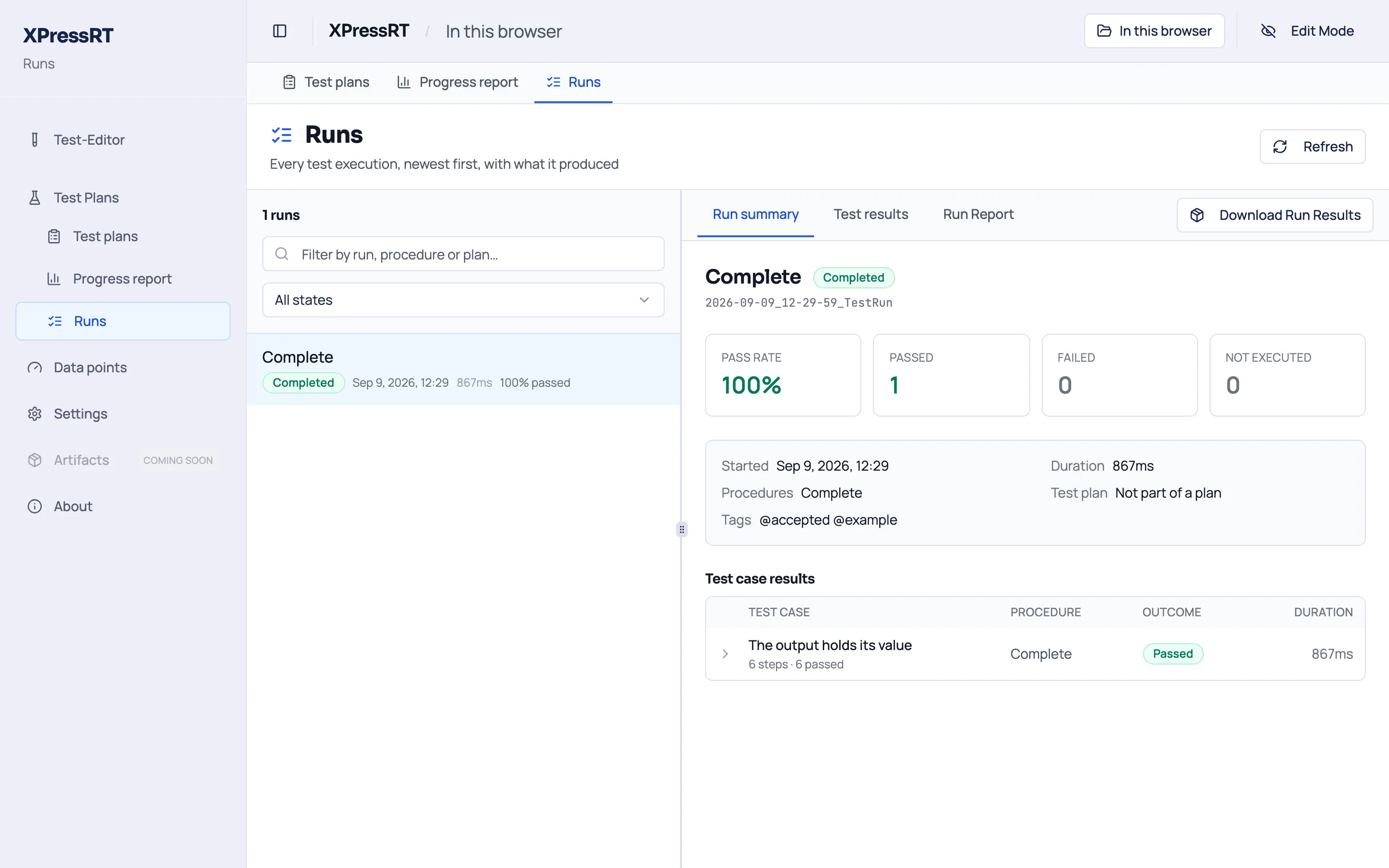
From the sequence of these steps a procedure emerges that you click through or let run. The record appears as you go, not afterwards.
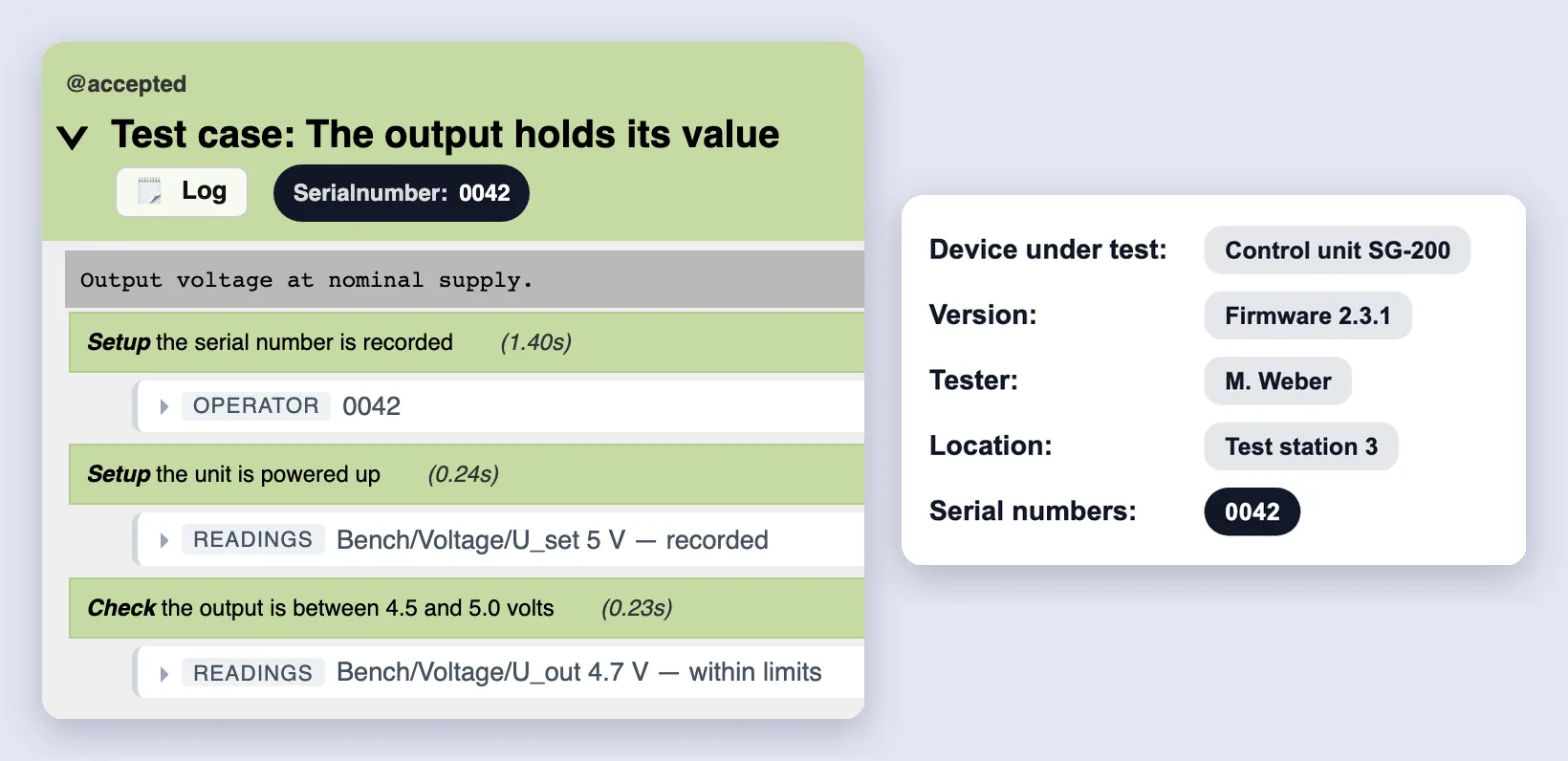
In the report, every value shows how it was obtained – measured, entered, set or derived – with source, timestamp and test context. When a measuring instrument later takes over the same step, it is not the test that changes but the origin. And the origin is in the record.
Concrete
A test step is a building block, not a script
A systems engineer describes what should be tested:
Set the supply to 24 volts. Simulate a sensor failure. Check whether the safe state is reached within 100 milliseconds. Record current draw and the CAN signal. The operator then confirms the visual warning indicator.
This does not become an opaque code file, but a readable procedure of reviewed building blocks:
- Set the supply — Device action
- Simulate a sensor fault — Fault/stimulus action
- Monitor the CAN message — Interface check
- Assess the timing condition — Time and limit check
- Measure and record the current — Measurement and recording
- Show the operator dialog — Operator dialog
- Record pass/fail — Assessment
- Produce report and evidence — Documentation
Before execution it is not source code that gets reviewed, but the test process: what is set, measured, assessed and documented?
The domain experts review the flow at the process level. XPressRT handles execution at the device, interface and bench level.
Control
Who reviews the test case the AI wrote?
A generated test case nobody reads is not evidence. A green run then proves that the code runs – not that it checks the right thing. In the audit the question still comes up: who reviewed and released the test case?
The AI writes no code. It produces no freely generated execution code, but a sequence of defined, versioned building blocks. Each building block is a sentence a person reads; XPressRT turns them into the executable step. If a building block is missing for what a step needs, the AI stops and says which one – it doesn’t build its own.
The release is bound to its state. It records who released which step, with the fingerprint of the building blocks and of the code generated from them. If a building block or the flow changes afterwards, the release becomes recognizably no longer valid and the step must be reviewed again.
Everyone can read it. The building blocks can also be checked by someone who doesn’t program: quality assurance, regulatory, the auditor.
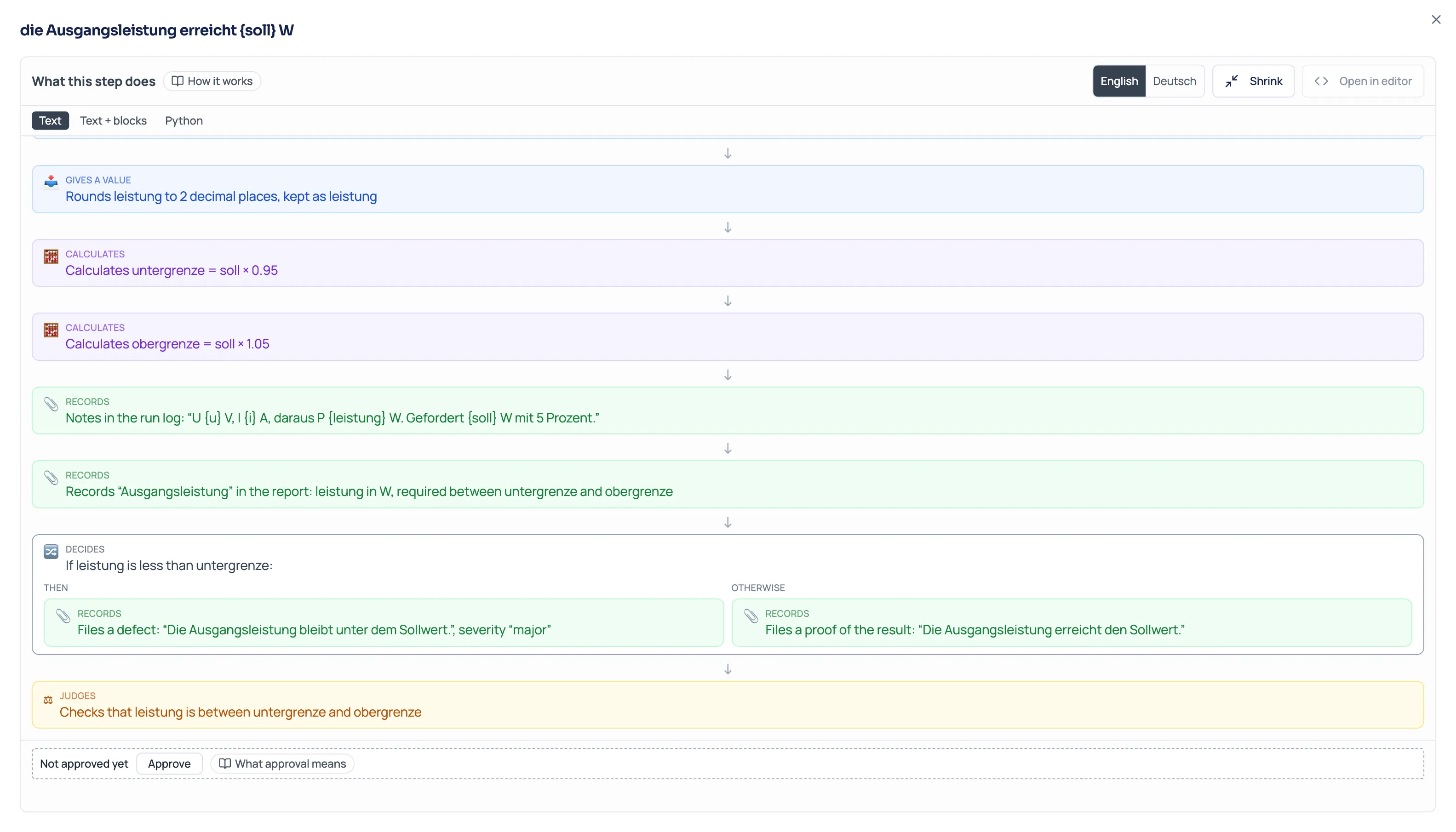
What this means in a regulated context: Who releases an AI test case?
Migration
Your existing test procedures come along
Your test instructions live in Word tables and Excel sheets. Give one to your AI assistant – Claude, Copilot, whatever you already use. In a first pass, within a few minutes a structured test draft emerges: steps, limits, data points. Your team reviews it, adds what’s needed and releases it. That is at the same time the review your process requires anyway.
XPressRT runs no AI model of its own and does not process your source documents on our systems. Which AI service is used and which data reaches it, you decide through your own company environment and the policies that apply there.
The source file stays attached to the imported test case. Released test cases stay released, instead of being rewritten.
Keeping your test records in Excel today? Here is how to replace them.
Getting started
Open the browser, and go
XPressRT’s free demo version runs entirely in the browser – the interface and the test run itself.
- No installation. Nothing to set up, no IT approval.
- No account. In the free version you sign in nowhere.
- No cloud. Your test procedures and results stay on the machine where you test. No data goes to us.
- Versionable with Git. A workspace is a folder of text files.
git initis enough, and every change to a test is traceable.
If you want to run XPressRT centrally in your own network: on request we set that up with you.
What you get out of it
The benefit, on four axes
Saves time right away
The record appears while you test. The biggest block of time in manual testing is the rework: transferring values, building a table, writing a report. That’s gone. A new test step needs no developer: you select and fill in, instead of programming. No waiting for the one colleague who knows Python.
Prevents expensive mistakes
The skipped step, the estimated instead of measured value, the record with no assignment, the unit still in the previous state. And the most expensive of all: the silent green. An aborted step is red. A run in which nothing was executed reports “not run” instead of “passed”.
Lowers your personal risk
Whoever signs doesn’t have to remember: the evidence is created at the moment of testing. Whatever stood out sits at the step where it happened. And the report works without you: quality assurance, customer or auditor read it without asking the person who built the test.
Carries the release
Per unit: every step with its result, actual against limit, serial number, product and version, tester, station, timestamp. Alongside it, machine-readable JUnit XML and a raw log. Test plans state what must be tested for a release and how far it has got; a closed cycle freezes the state and stays citable. This supports the traceable linking of requirements, risks, test steps and evidence – for example within a process to IEC 62304 or IEC 61508.
Build it yourself?
For one test you can do it yourself. For twenty?
Your team can build a Python prototype in a few weeks, address devices over APIs and produce a first report. That’s true, and with AI it’s truer than before.
The question is a different one: do you want to develop, review, qualify and maintain your own test software again for every product, every interface, every new measuring instrument and every release regression?
| Self-built | With XPressRT |
|---|---|
| Fast for one use case | Reusable across products and releases |
| Test knowledge sits in code and in individual heads | The flow is readable to the domain and reviewable at the process level |
| Every new device is development effort | Standardized connection |
| Reports and analysis added per project | Consistent from execution to report |
| Maintenance competes with product development | Built for it |
| Change impact analyzed by hand | Requirements, tests and regression linked |
| Build the qualification yourself | Controlled building blocks, versioning, review, evidence are part of it |
For a single, stable test procedure a self-build is often sensible. XPressRT becomes interesting once tests become cross-product, variant-specific, recurring, traceable or regulatory-relevant.
Why now
The burden of proof grows faster than test capacity
More features, the same test crew
AI-assisted development produces more features per release. They still have to be tested, on the real device, by people. The bottleneck shifts from building to proving.
Every update is a new verification
From 11 December 2027 the Cyber Resilience Act requires security updates across the entire support period. Each one changes a device in the field – and each one needs evidence. Anyone keeping that by hand can hardly afford updates.
Word and Excel don't scale with it
With a handful of units a record made of tables holds. With device variants, firmware versions and recurring tests it becomes manual work nobody can oversee any more – and that can no longer be pieced together in an audit.
What XPressRT is not
Your requirements system stays where it is
We don’t replace Polarion, Codebeamer, Jama or DOORS. Your requirements stay there, and we write nothing back. XPressRT lays the execution and evidence layer on top: a test case carries its tags, a plan shows what of it is covered.
And just as clearly: XPressRT supplies no instruments and no test bench. Where you test against real embedded firmware, LoopCheck (Hardware-in-the-Loop) covers the signal side. And if you would rather not build the test setup, the test cases and the evidence yourself, we take that on as a complete test environment.
What's taking shape
The same test cases, now on real hardware
A step says what to do; the bench says with what. The seam between them is the data point: a named quantity with a unit and a range. Today a human reads the value, tomorrow a device. The test case stays the same. We’re working on the runner that binds these points to hardware.
Pricing
Testing is free, proving is paid
Free: XPressRT in the browser. Create procedures, run them, record. No account, no installation, forever.
License: running in your own network, connecting measuring instruments and test benches, support.
Your procedures and results sit with you as files. Even without us they stay readable.
Start testing instead of managing tests
Every step in detail: the XPressRT manual walks through every function with a complete example – from the building blocks to the release. Or open the free version and create a procedure right away.
Frequently asked questions about XPressRT
What is XPressRT?
XPressRT is test software that teams use to run their test procedures on the device instead of just filing them away. A test case is made of steps; each step takes a reading or checks it against its limit. Each tested unit leaves an audit-ready record with value, limit, serial number and tester.
What does XPressRT cost?
Creating procedures, testing by hand and documenting is free and needs no account. You pay only when a company has to prove something to a third party – with release and signature, roles and stations, calibration status and mapping to a standard – or wants to run XPressRT as its own instance.
Is there a free demo version?
Yes. The free demo version runs in the browser, with no installation and no account – and it is permanently free, not time-limited. You only pay when you need to prove something formally to a third party.
Does XPressRT need an installation or an account?
No. XPressRT runs entirely in the browser – no installation, no account, no cloud. Your procedures and results stay on the machine where you test.
Can manual and automated tests be mixed?
Yes. The same test case can run by hand, partly automated or fully on the bench – only who supplies the values changes (a person or a device). The test case does not have to be rewritten.
What is XPressRT good for?
System tests and end-of-line checks on embedded devices where each unit needs an audit-ready record – for example in medical technology or for safety-related devices.
Is the evidence good enough for verification to IEC 62304?
XPressRT documents test procedures and results traceably: unit, serial number, software or firmware version, readings, limits, tester, timestamp and links to requirements. That way XPressRT supports the evidence for your verification process. Whether a generated record is sufficient for your specific verification plan, and to what extent XPressRT has to be qualified or validated in your QM system, depends on the intended use, risk and system context. On request we support you with the documentation and a suitable approach.
How does XPressRT reach our measuring instruments?
Through a runner that runs in your lab and talks to the instruments. Without it you run the same procedures by hand.
What can I do with AI agents in XPressRT?
Your AI assistant – Claude, Copilot, whatever you already use – connects to your workspace over MCP and works on the procedures with you: turn existing Word and Excel procedures into runnable steps, create new steps, write their logic as readable building blocks and build them, add helper data and modules. Every building block is a sentence a person reads – not opaque code. If a building block is missing for what a step needs, the agent stops and says which one instead of inventing its own.
Where does the AI agent run, and what can it not do?
The assistant runs at your end, not ours – we run no model and never see your documents. And it works within clear limits: only a person can release a step, finished results stay immutable, and the procedures themselves are written by the interface. The agent proposes and places building blocks; the signature stays with the person who reviews them.
Is there a manual?
Yes. The XPressRT manual walks through every function with a complete example – at xpress.rx-systems.de.